Software ray tracer with PBR materials, and a polygonal bunny!

Course
Graphics Programming 1
Project Duration
1 Month
Github Source
https://github.com/Vincent-VD/Software-RayTracer
At the beginning of last year, we were tasked with making a software ray tracer. Adding more features every week (like a camera, lights, shadows, materials, triangles…), the program quickly grew more and more complex. This project challenged me in ways I wasn’t used to. Before this, I had just used SDL to display sprites onto the screen, but this time, I was casting rays from a camera into a scene, which at times was a bit difficult to wrap my head around. The only things provided to us were an SDL window, and a file containing some structs. Then, every week, we had to implement new features into our ray tracer.
There were several parts in this project where I struggled, the camera and the triangle mesh for the Stanford bunny. The camera took me quite a while to get right, but after asking the course instructor for help, he told me I should try to look at it more simply. Every function tied to camera movement, contained some transformation code, making the entire update loop very decentralized. When I did as he told me to, and tried to contain all ONB matrix calculations in a single function, it became much easier to figure out where and what went wrong. The snippet below shows how I sent about updating
void Camera::CalculateLookAt() {

	FVector3 forward{}, right{}, up{};
	if (m_ShouldRotate) {
		forward = Elite::MakeRotationY(m_YawAngle) * m_Forward;
		right = GetNormalized(Cross(m_WorldUp, forward));
		forward = Elite::MakeRotation(m_PitchAngle, right) * forward;
		right = GetNormalized(Cross(m_WorldUp, forward));
		up = GetNormalized(Cross(m_Forward, right));
		m_Forward = forward;
	}
	else {
		right = GetNormalized(Cross(m_WorldUp, m_Forward));
		up = GetNormalized(Cross(m_Forward, right));
	}

	m_ONB[0] = FVector4{ right.x, right.y, right.z, 0.f };
	m_ONB[1] = FVector4{ up.x, up.y, up.z, 0.f };
	m_ONB[2] = FVector4{ m_Forward.x, m_Forward.y, m_Forward.z, 0.f };
	m_ONB[3] = FVector4{ m_Position.x, m_Position.y, m_Position.z, 1.f };
	m_PitchAngle = 0;
	m_YawAngle = 0;
	m_ShouldRotate = false;
}

void Camera::MoveDown(float elapsedSec) {

	m_Position -= m_ONB[1].xyz * m_Velocity.x * elapsedSec * 0.2f;
	m_ONB[3].xyz = FVector3(m_Position.x, m_Position.y, m_Position.z); //update position
}

void Camera::Pitch(float elapsedSec) {

	const float angle{ static_cast<float>(mouseY) * elapsedSec };
	m_PitchAngle += angle * static_cast<float>(E_TO_RADIANS);
	m_ShouldRotate = true;
}
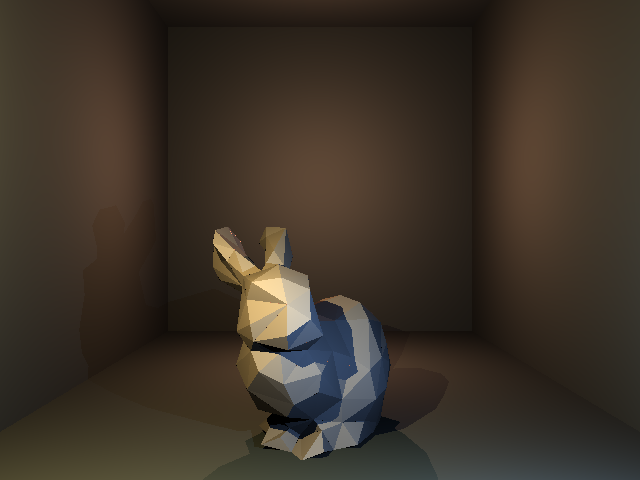
The second part I struggled at is one that I am really proud of how it turned out in the end. Having just made simple triangles (like in the screenshot above), our next task was to render out the Stanford bunny. My first thought was to make the mesh consist of Triangle instances, read from the obj file. This quickly proved to be less than ideal, as my mesh wasn’t rendering correctly. Someone then noted that this way of doing caused a lot more memory to be used, as I was storing every vertex more than once. So, I simply stored all vertices and indices in vectors, and looped over them. This allowed the TriangleMesh class to be independent from the Triangle class, and to allow code to be easily shared between both classes, without duplicating it, I put the shared code into a separate namespace, and call the namespace function in both classes.
namespace TriangleHelpers {

	void SetTranslation(const FPoint3& position, Elite::FMatrix4& translationMatrix);
	void SetRotationY(float radians, Elite::FMatrix4& rotationMatrix);
	void Update(float& totalRotationY, const Elite::FMatrix4& translationMatrix, Elite::FMatrix4& rotationMatrix, std::vector<Elite::FPoint3>& verts, std::vector<Elite::FPoint3>& transformedVerts, float elapsedSec, bool isRotating);

	bool HitTriangle(const FPoint3& v0, const FPoint3& v1, const FPoint3& v2, const Cullmode cullmode, const Ray& ray, HitRecord& hitRecord, BaseMaterial* material, const bool shading);

}
 Vincent Van Denberghe