Combined software and hardware rasterizer with DirectX 11
Course
Graphics Programming 1
Project Duration
2 Months
Github Link
https://github.com/Vincent-VD/DualRasterizer
For the second assignment for this course, we got to work on a rasterizer. We started by making a rasterizer in software, to give us an understanding of how rasterization works exactly, and after that we worked with DirectX 11 (DX 11) to achieve the same results, and more. Coming from a ray tracer, which was pretty logical in its core concept, the rasterizer was quite a bit more difficult to wrap my head around at first. but I got the hang of it pretty quickly. The end assignment had us combine both the hardware and software implementations into a single program.
Changing the rendering modes wasn’t as simple as just combining code from both projects, and running it. There are some things I needed to take into account when combining both versions. For starters, the camera forward and right vectors as well as the movement speed variables needed to be flipped in order for the controls between both versions to work. I also moved some code to places that made more sense, like object rotation to the object itself instead of the render class.
I won’t go into too much detail about how the rasterizer works, but there are some things I’d like to touch on, more specifically on the HLSL shader code and the extra Easter egg I programmed in. The HLSL code was particularly tricky. We had to write a Lambert Phong shader, which already proved a challenge in the software version, but the HLSL version proved even more of a challenge. At first I tried doing it exactly as I did in the software version, using HLSL functions where I could, but I couldn’t get it right. Then I compared differences with a friend, and noticed some differences, so I tried adding those and it worked! I was really quite happy that I got it right.
float4 LambertPhongShader(VS_OUTPUT input, SamplerState samState)
{
	float3 viewDirection = normalize(input.WorldPosition.xyz - transpose(gONB)[3].xyz);
	float3 binormal = cross(input.Tangent, input.Normal);
	float3x3 tangentSpaceAxis = { input.Tangent,
								  binormal,
								  input.Normal };
	float3 normalMapSample = (float3)gNormalMap.Sample(samState, input.UV);
	normalMapSample = (normalMapSample * 2) - float3(1, 1, 1);
	float3 newNormal = mul(transpose(tangentSpaceAxis), normalMapSample);
	float observedArea = dot(newNormal, -gLightDirection);
	observedArea = saturate(observedArea);

	float exp = gGlossMap.Sample(samState, input.UV).r * gPhongSettings.z;

	const float3 reflect = gLightDirection - (2 * dot(newNormal, gLightDirection)) * newNormal;
	const float cosAlpha = saturate(dot(reflect, -viewDirection));
	const float4 phongValue = gSpecularMap.Sample(samState, input.UV) * pow(cosAlpha, exp);

	const float4 diffuseColor = gDiffuseMap.Sample(samState, input.UV) * gPhongSettings.y * observedArea / gPhongSettings.x;
	const float4 finalColor = phongValue + diffuseColor;
	return finalColor;
}
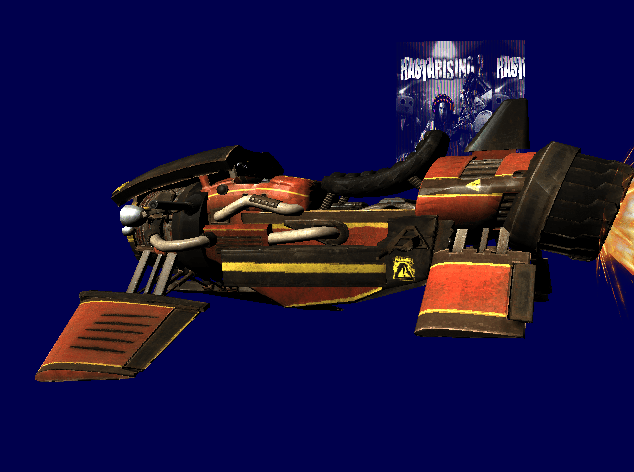
The second part isn’t exactly a technical marvel of graphics innovation, but I am proud I added it nonetheless. When I made it, I had been wondering how exactly cheat codes work in games. I first tried it for an earlier project, storing inputs in a vector, and comparing them with a preset vector of inputs. If it was the same, the cheat code would activate, but if it wasn’t the user input array was cleared and you had to start over. However, as you might be able to guess, this didn’t work out that well. So for this project I tried something different: Simply store the preset input vector, and maintain an index indicating the current position in the array, which resets when a wrong button gets pressed. While the project only had 1 code, I could easily adapt it to scale to multiple codes. For this project, when the Konami code was entered, an image would appear on-screen saying “Rastarizing 2” (see image above). When I told the teachers about this on the exam, they quite liked it.
void Elite::Renderer::RegisterKeyPress(SDL_Scancode key)
{
	if (!m_DisplayEasterEgg)
	{
		if (key == gKonamiCode[m_Iter])
		{
			++m_Iter;
			std::cout << "Next\n";
		}
		else
		{
			m_Iter = 0;
		}

		if (m_Iter == gKonamiCode.size())
		{
			HANDLE hConsole = GetStdHandle(STD_OUTPUT_HANDLE);
			SetConsoleTextAttribute(hConsole, 118);
			std::cout << "*****************************************************" << std::endl;
			std::cout << "KONAMI CODE ACTIVATED: press 'k' to toggle easter egg\n";
			std::cout << "*****************************************************" << std::endl;
			SetConsoleTextAttribute(hConsole, 15);
			m_DisplayEasterEgg = true;
		}
	}
}
 Vincent Van Denberghe